
Phishing Emails Look Legitimate Now - Here's What Gives Them Away
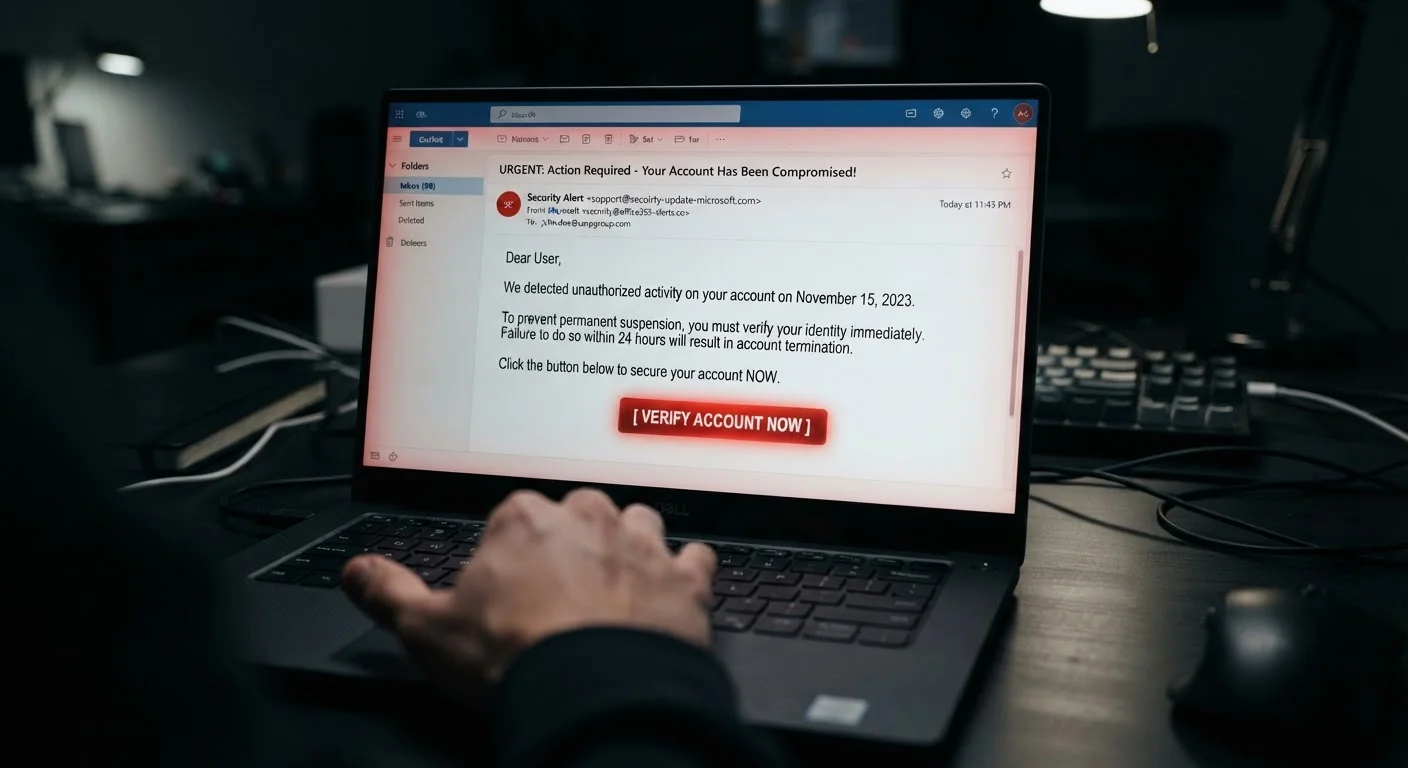
Photo credit: SmartReads.net | Simple Search, Relevant Results
In this article
Modern phishing attempts are increasingly convincing. Learn the subtle signs that separate a genuine email from a carefully crafted scam.
Key Takeaways
- Modern phishing emails frequently use correct branding, grammar, and formatting to appear legitimate.
- The sender's display name can be faked - always inspect the actual email address domain.
- Urgency and fear are the most common psychological levers phishing messages use.
- Hovering over links before clicking reveals mismatched or suspicious destination URLs.
- Legitimate organizations will never ask for passwords or full account numbers via email.
- Reporting suspicious emails to your IT team or email provider helps protect others.
Why Phishing Emails Are Harder to Spot Than Ever
Phishing has undergone a quiet professionalization. Attackers now routinely clone the exact HTML templates, logos, and footer disclaimers of major banks, shipping carriers, and SaaS platforms. Grammar is clean. Branding is pixel-perfect. The message arrives in your inbox at a plausible time of day and references a service you actually use.
This shift is partly fueled by the widespread availability of phishing-as-a-service kits - prebuilt tools sold on criminal marketplaces that give even low-skilled attackers a polished, ready-to-deploy campaign. The result is a volume and quality of fraudulent email that was unimaginable a few years ago.
Understanding what attackers can fake - and what they cannot - is the foundation of a reliable personal defense. See our digital security audit checklist for a broader look at where everyday users are most exposed.
3.4 billion
Phishing emails sent daily worldwide
Estimates from cybersecurity researchers suggest phishing remains the most prevalent vector for cyberattacks by volume.
36%
Of data breaches involve phishing
According to Verizon's Data Breach Investigations Report, phishing consistently ranks among the top initial access methods in confirmed breaches.
~$4.9M
Average cost of a phishing-related breach
IBM's Cost of a Data Breach Report found phishing-initiated breaches among the most costly incident types for organizations globally.
The Tells That Still Give Phishing Away
Despite how convincing they look, phishing emails consistently leave traces. Knowing where to look changes everything.
The sender domain doesn't match the brand
Display names are trivially easy to forge. An email can show "PayPal Support" in your inbox while the actual sending address is something like support@paypal-alerts-secure.net. Always expand the sender field and scrutinize the domain after the @ symbol. Legitimate organizations send from their own registered domain - nothing appended, nothing hyphenated in unfamiliar ways.
The link destination doesn't align with the text
Hover over any link before you click. The URL that appears in your browser's status bar is the real destination. Watch for subtle misspellings (arnazon.com, micros0ft.com), extra subdomains (login.paypal.com.malicious-site.com - where the real domain is malicious-site.com), or URL shorteners that mask the destination entirely.
The message creates urgency or fear
"Your account will be suspended in 24 hours." "Unusual sign-in activity detected." "Action required immediately." These phrases are engineered to short-circuit careful thinking. Urgency is among the most reliable psychological signatures of a phishing attempt. Legitimate organizations give you time and multiple ways to verify. Attackers don't.
It asks for something no legitimate organization would request
No bank, government agency, or established platform will ever ask you to confirm your full password, Social Security number, or credit card CVV via email. If a message requests this, treat it as fraudulent regardless of how official it looks.
Check the Full Email Address, Not Just the Name
Your email client displays a sender's name by default - and that name can say anything the attacker chooses. Always click or expand the sender field to see the full email address. A mismatch between the display name and the actual domain is one of the clearest indicators of a spoofed message.
What Targeted (Spear) Phishing Looks Like
The most dangerous variant is spear phishing - messages tailored specifically to you. An attacker who has harvested your name, employer, job title, and a colleague's name from LinkedIn can send a message that reads: "Hi , I'm following up on the invoice we discussed - please review the attached document before end of day."
This level of personalization bypasses the pattern-matching most people rely on. The defense shifts from spotting generic red flags to verifying context: Did you actually expect this communication? Is the request consistent with how this person or organization normally contacts you? When uncertain, confirm through a separate, known channel - a direct phone call or an independently initiated email thread - rather than replying to the suspicious message.
For a deeper look at how compromised credentials feed these attacks, see why strong passwords still get compromised.
Building the Habit of Healthy Skepticism
Defending against phishing is less about any single tool and more about a consistent posture of skepticism toward unexpected email requests. A few habits make a concrete difference:
- Pause before acting on any email that asks you to click, download, or provide information - especially if it implies urgency.
- Navigate independently to websites rather than using links in emails. If your bank emails you about an alert, go to your bank's website directly.
- Enable multi-factor authentication (MFA) on your accounts. Even if a phishing attack captures your password, MFA creates an additional barrier an attacker can't easily bypass.
- Report suspicious messages using your email client's built-in phishing report function. This feeds detection systems that protect other users.
These habits connect directly to broader safe online practices - building safer online habits covers the full framework across every device you use.
“Attackers don't break in - they log in. Phishing works because it targets the human layer, not the technical one. The most resilient defense is an informed, skeptical user who pauses before they click.”
— Cybersecurity and Infrastructure Security Agency (CISA), U.S. federal agency responsible for national cybersecurity guidance
Frequently Asked Questions

Author
Technology Editorial Team
Technology Editorial Team is the collective byline for our editorial team and contributor network. Articles published under this byline or an editorial pen name are researched, written, and reviewed according to our editorial standards for clarity, consistency, and independence before publication.
View all articles →